Following up quotes as a tradesperson: a matter-of-fact reminder that settles the job
· By Kyle Nelson
Follow up a quote on a fixed schedule, briefly and by name, for example on working days 3, 7 and 12 after sending, then stop. A short, matter-of-fact reminder that names the quote settles whether the customer received it and is still interested. Decide the channel and the point where you close the quote before you send.
Is following up a quote pushy?
Following up is not pressure. It settles an open matter: did the quote arrive, are there questions, should the job start, or is it closed?
Quotes often come straight out of a site visit. The customer remembers the conversation, not every line. A short enquiry keeps it straight.
Follow-up does not repair a weak quote. If the job is unclear or a price is missing, fix that first. How to build the price is in Calculating your hourly rate as a tradesperson.
When should you follow up a quote?
Use a fixed time. Not every quote needs an instant chase, but every open quote needs a rule.
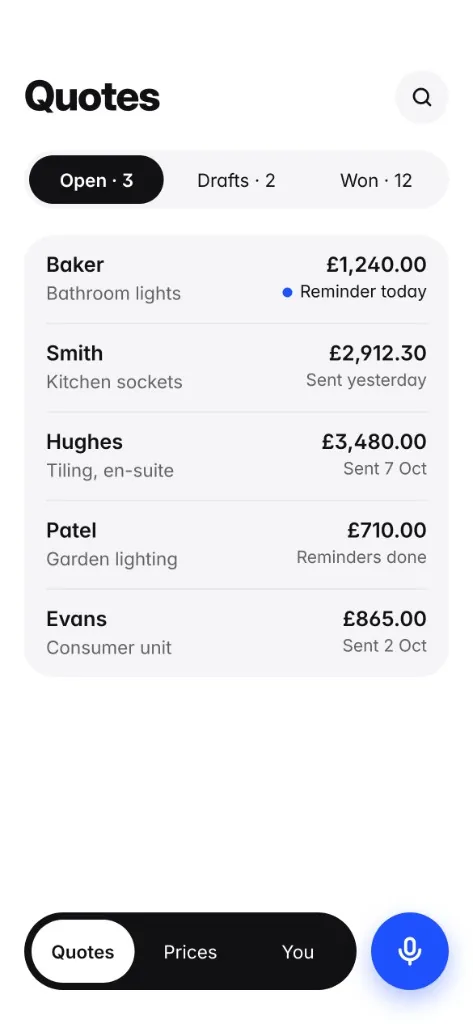
The app reminds you on working days 3, 7 and 12 after the quote is sent, then stops.
That principle works without an app too. A limited number of reminders, written down, with a clear end.
Want the exact words? See our UK quote follow-up templates.
| Situation | What to do | Goal |
|---|---|---|
| Quote has just been sent | Check it went out and note the matter | A clear starting point |
| Customer has not replied | Ask briefly and in a matter-of-fact way | Settle receipt and interest |
| Customer has questions | Answer the question and update the quote if the work changes | Avoid misunderstandings |
| Customer says no | Close the matter | Nothing left open |
| Customer says yes | Settle the start of the job and the next step | From quote to job |
What should the follow-up message say?
Keep it short. Name the quote, ask where things stand, and offer to clear open points.
Example:
Hello Jordan, I wanted to check that my quote reached you and whether anything is still unclear. If you have questions about the line items or the schedule, I can go through them. Thanks, Sam.
On WhatsApp it can be shorter, and it should stay clean. No pushing, no long explanation, and no new promise made in passing.
A simple question is enough:
Hello Alex, a quick question about my quote. Does it work as it is, or is there anything you want changed?
If there is still no reply, close it calmly:
Hello Jordan, I have not heard back about the quote. If the matter is settled, that is fine. If you still have questions, just reply.
What to check before the reminder
Before you chase, check the quote. The customer should not have to guess which work you mean or what it costs.
What must appear on a quote depends on your country and business type. Use our free estimate template or our UK quote template. Both list the details with official sources.
- Was the quote actually sent?
- Is the customer named correctly?
- Are the job, the quantities and the prices clear on each line?
- Do you know the question you want to ask?
- Have you decided when you will stop?
Typical mistakes
Too much text. The customer does not need a second meeting by message. A short enquiry is enough.
No reference. "How is it looking?" does not say which quote you mean. Name the quote or the work.
Too many reminders. A fixed sequence with an end is easier to trust than a string of chasers.
New promises on the side. A price change, extra work or a different quantity belongs on the quote, not in a message that is hard to find later.
Chasing a quote that is not ready. If the job, a quantity or a price is missing, correct the quote first.
A simple routine
Set it up so it still works on a busy day. After sending, it should be clear who follows up, which channel is used, and when it stops.
One routine: write the quote, check it, send it, note the reminder, record the reply, then record the job or the no. Plain, and enough.
The tone can stay plain too. Matter-of-fact, specific, and easy to answer.
Faster with Quotebefore
On the iPhone, describe the job on site. Speech recognition and extraction turn it into line items with quantities and units. Prices come from your own earlier quotes. If the job, the quantities or the price are missing, Quotebefore tells you before export. The app reminds you on working days 3, 7 and 12 after the quote is sent, then stops. No account.
Sources
- Quotebefore on the UK App Store, first 3 quotes free and follow-up reminders: https://apps.apple.com/gb/app/quotebefore-job-quote-maker/id6801658124
- Quotebefore on the US App Store, first 3 estimates free: https://apps.apple.com/us/app/quotebefore-estimate-maker/id6801658124
- Apple Support, Cancel a subscription from Apple: https://support.apple.com/en-us/118428