Dictating quotes with an app in 2026: what tradespeople should look for
· By Kyle Nelson
Dictating quotes with an app is worth it when the app turns what you say into line items with quantity, unit and price, because that is what the customer checks. It should take prices from your own earlier quotes, tell you before export what is missing, and keep customer details where you can see them.
Does dictating a quote replace pricing?
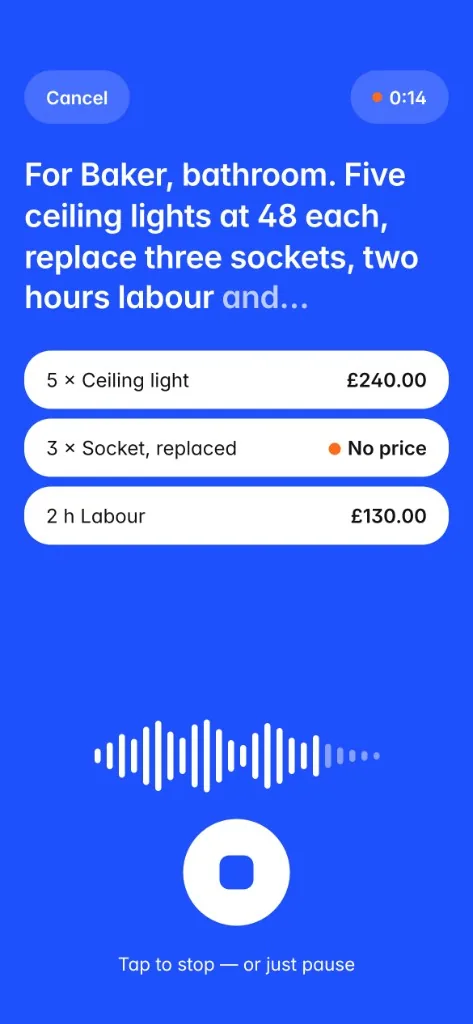
Dictation does not replace your pricing. It records the job on site and turns it into structured line items. A spoken sentence should become one line with the service, the quantity, the unit and the price.
That matters most on site, where the measurements and the extra work are in front of you. Rebuilding the quote from memory later is where gaps creep in.
Voice on its own is not enough. The app also has to handle prices, the check before export, and follow-up. A wider set of criteria is in The best quoting app for tradespeople in 2026.
The key checks
| Area | What to look for | Practical benefit |
|---|---|---|
| Voice input | You can describe the job, quantities and prices out loud. | The dictation becomes line items. |
| Line items | Quantity, unit and price sit on the same line. | The quote can be checked. |
| Price source | Prices come from what you say or from your own earlier quotes. Nothing is invented. | You can explain every figure. |
| Check before export | A missing job, quantity or price is flagged before the PDF. | The gap shows up before the customer sees it. |
| Account | You can see whether an account is required. | You know what you are signing up for. |
| Follow-up | After sending, a limited reminder brings the quote back. | Open quotes stay in view. |
Should the app guess prices?
The price is the sensitive part. An app must not pretend to know your hourly rate or your mark-up. If a price was not spoken, there has to be a clear rule.
Quotebefore uses prices from your own earlier quotes. If the price is missing, it tells you before export. Check that every line can be traced. A tidy PDF is not the same as a price you can stand behind.
What must be on the quote before you send it?
What must appear on a quote depends on your country and business type. Use our free estimate template or our UK quote template. Both list the details with official sources.
The useful check is the one that runs before export. Quotebefore tells you if the job, the quantities or the price are missing, so you can fix that before the quote reaches the customer.
Data protection
A dictated quote can include a customer name, an address, the work and the prices. Check where that goes, and whether the app requires an account.
Quotebefore does not ask you to create an account. Speech recognition and extraction run on the iPhone. Sending by email, WhatsApp or PDF should happen only when you trigger it.
Checklist before you choose
- Can services, quantities, units and prices be captured by voice?
- Does the dictation produce clear line items?
- Are missing prices left for you, rather than guessed?
- When a price comes from an earlier quote, can you see that it is yours?
- Does the app tell you before export if the job, the quantities or the price are missing?
- Is it clear whether an account is required?
- Is follow-up limited, matter-of-fact, and easy to stop?
Do not forget the follow-up
A sent quote is not yet a job. The usual routine is a short reminder, a chance to clear questions, and a request for a decision.
The app reminds you on working days 3, 7 and 12 after the quote is sent, then stops. The limit matters, so follow-up does not become pushy. Wording and timing are in Following up quotes as a tradesperson.
Faster with Quotebefore
On the iPhone, describe the job on site. Speech recognition and extraction turn it into line items with quantities and units. Prices come from your own earlier quotes. If the job, the quantities or the price are missing, Quotebefore tells you before export. The app reminds you on working days 3, 7 and 12 after the quote is sent, then stops. No account.
Sources
- Quotebefore on the UK App Store, first 3 quotes free and follow-up reminders: https://apps.apple.com/gb/app/quotebefore-job-quote-maker/id6801658124
- Quotebefore on the US App Store, first 3 estimates free: https://apps.apple.com/us/app/quotebefore-estimate-maker/id6801658124
- Apple Support, Cancel a subscription from Apple: https://support.apple.com/en-us/118428